Thursday, December 17. 2009
iPhone USB Tethering without iTunes

I have spent days figuring this out.
- Install AppleApplicationSupport.msi (must be installed before AppleMobileDeviceSupport.msi)
- Install AppleMobileDeviceSupport.msi (do not change the installation directory)
- Copy QTCF.dll, QuickTime.qts, QuickTimeVR.qtx (from QuickTime) to C:\Windows\System32\
Some people have reported, iPhone USB tethering works after AppleMobileDeviceSupport.msi installation alone (without AppleMobileDeviceSupport.msi). Unfortunately, this is not my experience.
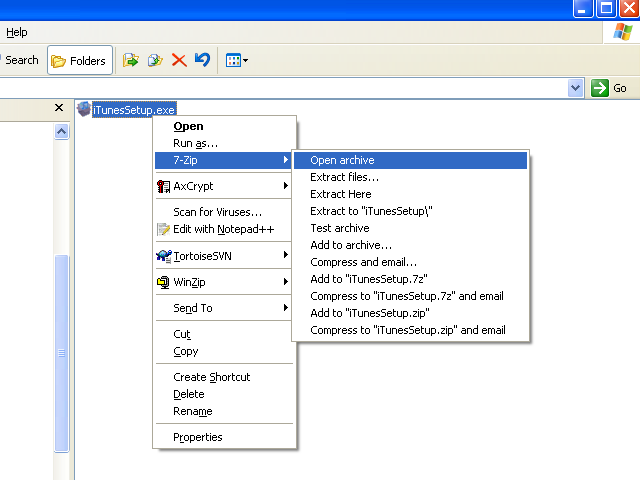
Both AppleApplicationSupport.msi and AppleMobileDeviceSupport.msi can be extracted from iTunesSetup.exe by using 7-zip.
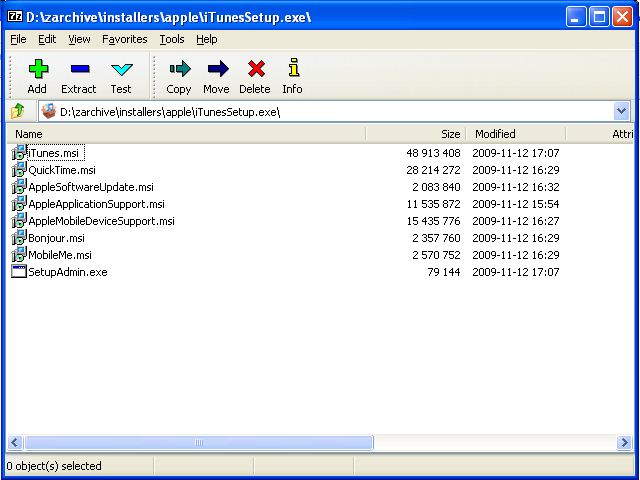
AppleApplicationSupport.msi is to install some files in "C:\Program Files\Common Files\Apple\Apple Application Support" and also to install Visual C Run Time Library (This is to say iTunes is developed using Visual C - my guess). In actual fact, only the Visual C Run Time Library is important. For my version of iTunes, it uses Visual C Run Time Library version 8.0.50727.4053. The Run Time Library will be installed into "C:\WINDOWS\WinSxS\x86_Microsoft.VC80.CRT_1fc8b3b9a1e18e3b_8.0.50727.4053_x-ww_e6967989". Without this library, USB tethering fails to work although iPhone can be detected as "Apple Mobile Device Ethernet", the 2 monitor icon at the system tray just shows "Network cable unplugged".
As stated earlier, install AppleApplicationSupport.msi and then AppleMobileDeviceSupport.msi. Reversing the sequence does not work.
 I was running iPhone 4 with iOS 6.12.
I follow the all steps. Step by step.
NO CONNECTION AND Still RED Cross.
Someone test on this configuration like I send?: " #37 seb on 2014-02-12 18:38 "
In this description there is no information about configuration and what itunes is used. I study this description and maybe I don't see something.
Can someone PLEASE make description like for me (not good undrestanding). Description Step by step with all configuration:
1. Operating System? system 32 or 64bit?: exp: windows 7 32 bit
2. iOS?
3. with links to download what is needed
Best Regards
Seb
I was running iPhone 4 with iOS 6.12.
I follow the all steps. Step by step.
NO CONNECTION AND Still RED Cross.
Someone test on this configuration like I send?: " #37 seb on 2014-02-12 18:38 "
In this description there is no information about configuration and what itunes is used. I study this description and maybe I don't see something.
Can someone PLEASE make description like for me (not good undrestanding). Description Step by step with all configuration:
1. Operating System? system 32 or 64bit?: exp: windows 7 32 bit
2. iOS?
3. with links to download what is needed
Best Regards
Seb

Calendar

|
April '24 | |||||
| Mon | Tue | Wed | Thu | Fri | Sat | Sun |
| 1 | 2 | 3 | 4 | 5 | 6 | 7 |
| 8 | 9 | 10 | 11 | 12 | 13 | 14 |
| 15 | 16 | 17 | 18 | 19 | 20 | 21 |
| 22 | 23 | 24 | 25 | 26 | 27 | 28 |
| 29 | 30 | |||||
Syndicate This Blog


Categories
Archives
Recent Entries
- Taiwan 2013 - day 16
- Tuesday, December 10, 2013
- Taiwan 2013 - day 15
- Monday, December 9, 2013
- Taiwan 2013 - day 14
- Sunday, December 8, 2013
- Taiwan 2013 - day 13
- Saturday, December 7, 2013
- Taiwan 2013 - day 12
- Friday, December 6, 2013
- Taiwan 2013 - day 11
- Thursday, December 5, 2013
- Taiwan 2013 - day 10
- Wednesday, December 4, 2013
- Taiwan 2013 - day 09
- Tuesday, December 3, 2013
- Taiwan 2013 - day 08
- Monday, December 2, 2013
- Taiwan 2013 - day 07
- Sunday, December 1, 2013
Quicksearch
Blog Administration
Powered by